
Make LKA File Operating stepsExplained below are the operating steps for making an LKA
file.
1
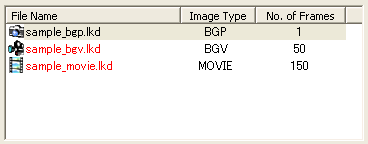 The LKD list is on the top left of the screen. Stock LKD file candidates here that you want to record in LKA files. To stock candidates on this list, click Open LKD File on the top right of the screen. 2
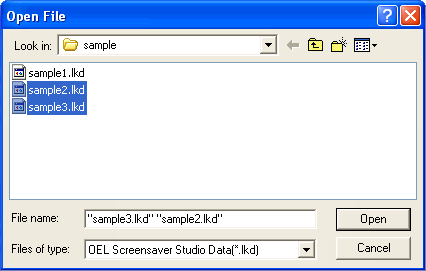 In the LKD file selection screen, select the LKD files that you want to stock on the LKD list. While holding the Ctrl key down and clicking on the icon, you can select multiple LKD files. Additionally, when you hold down the shift key and click all of the icons in the range of the cursor are selected. 3
When you select LKD files stocked in the LKD list, a preview is generated to the right. (Those displayed in red are already recorded on the LKA list.) When you want to record selected LKD files on the list for LKA files,
click on the When deleting the recorded files from the LKA file list, select the
LKD files you want to delete from the LKA file list and click the 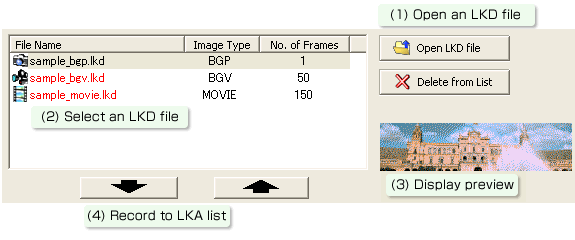 4
When you have recorded all the LKD files you want to send, click on Write LKA File to end. The LKA files that you have created previously will be overwritten, when you wish to retain these files, copy them into another folder. Additionally, when you change the LKA file name, the car audio cannot read them. 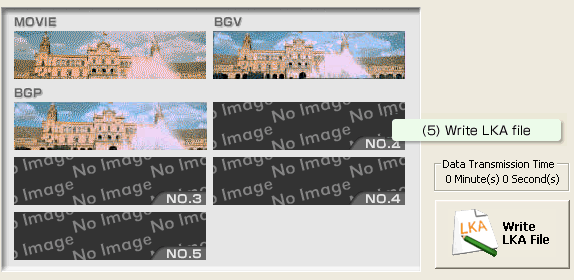 The file ent_disp.lka will be created. Write this file to the CD and put it into the car audio. *For more details on how to operate the car audio, see
the car audio instruction manual.
|
 button.
(When recording BGP, by selecting the frames you wish to record you can
record them in an optional location.)
button.
(When recording BGP, by selecting the frames you wish to record you can
record them in an optional location.) button.